How-to
How to Install a Wall-Mounted Folding Table Into Studs, Step by Step
Screw the brackets of a wall-mounted folding table into wood studs, into a ledger board that is itself screwed across studs, or into brick or concrete with the anchors the maker specifies. Never into drywall alone. With a drill, a stud finder and a level, the job is manageable for a careful DIYer; the manual of your table decides the hole sizes and screws.
Disclosure: This page contains affiliate links (marked with *). If you buy through them, we earn a small commission at no extra cost to you. As an Amazon Associate I earn from qualifying purchases. Learn more
The short version
Find and mark the studs, mark the finished top edge (about 29 to 30 inches for meals), check that both brackets land on studs, then drill and screw exactly as the manual says. VIVO's manual, for example, says not to install into drywall alone and to fix three holes per bracket into the center of a stud. If a bracket misses a stud, mount a ledger board across at least two studs first.
What you are aiming for
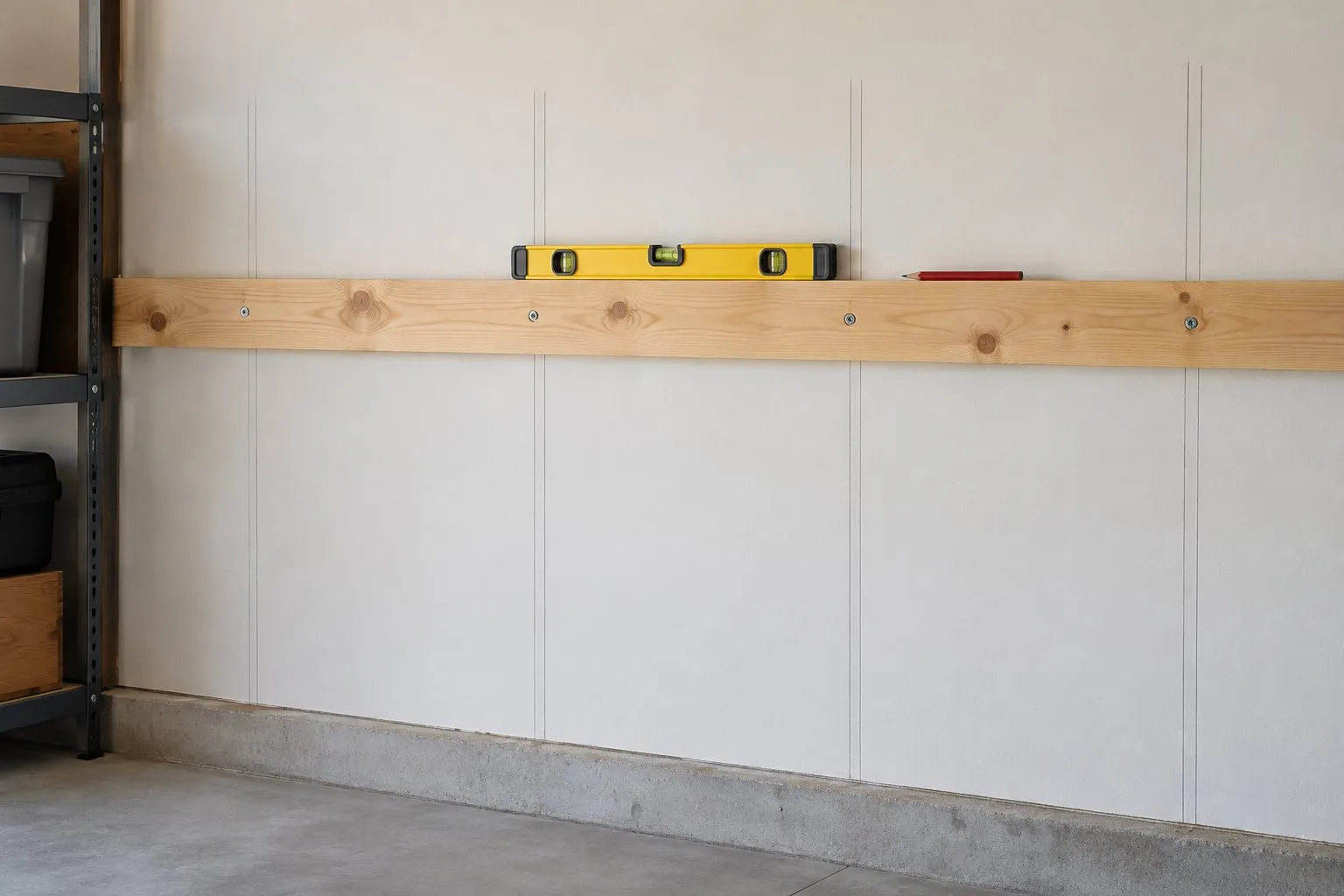
A finished fold-down table has every bracket screwed into a wood stud, into a ledger board screwed across studs, or into solid brick or concrete with the anchors the maker supplies for that wall. The top is level at the height you marked, and the latches lock every time you raise it. The order makes the job safe: wall first, height second, drill last.
Costway puts assembly of its drop-leaf table at about half an hour; the manuals of VIVO and Mount-It! give no time. What usually adds effort is a bracket that misses a stud, because then a ledger board comes first.
Tools and material
- Drill with the bit sizes from your manual (VIVO names 1/8 inch for wood studs and 5/16 inch for brick or concrete)
- Stud finder, pencil, tape measure
- Level, at least 24 inches long if you mark a ledger board
- Phillips screwdriver or driver bit
- The screws and anchors from the box – but only for the wall type the manual names
- For a ledger board: a straight board long enough to span at least two studs, plus screws long enough to reach well into each stud
Step by step
Read the manual and check the wall
Before you buy screws or drill a hole, find out what the wall is made of and which options your manual offers. VIVO and Mount-It! each describe two options: wood studs, or brick and concrete. Costway's instructions for its drop-leaf table use six anchors and only warn that each anchor must fit securely in the wall – they do not mention studs, so on drywall you choose the fixing yourself.Find and mark the studs
Run a stud finder along the wall, mark both edges of each stud and the center between them. Then measure from center to center. In wood-frame houses that distance is 16 or 24 inches, depending on stud size and what the wall carries (IRC Table R602.3(5)). Do not assume 16 inches – measure.Mark the top edge and the bracket line
Draw a level line where the finished top edge should be. For meals and seated work, about 29 to 30 inches above the floor is the usual height, inside the 28 to 34 inches the 2010 ADA Standards set for dining and work surfaces. Subtract the thickness of the top to get the line for the top of the bracket arms; the VIVO top, for example, is 1 inch thick. The guide to mounting height covers bar, desk and laundry heights.Check that both brackets land on studs
This is the step that decides whether the table holds. VIVO tells you to align three vertical holes on each bracket with the center of a stud and leave the other three unused. Mount-It! tells you to place its folding arms under the top so that the distance between them equals the distance between two stud centers. If a bracket cannot reach a stud, stop and mount a ledger board across at least two studs first (see below).Drill pilot holes as the manual specifies
Hold the brackets or the assembled top in place, mark through the holes and drill. VIVO specifies 3-inch-deep holes with a 1/8-inch bit in wood studs. For brick or concrete, VIVO uses a 5/16-inch bit, also 3 inches deep, and presses its anchors in. Mount-It! uses a 5/16-inch bit to 3.3 inches in concrete and warns not to drill into the mortar between bricks or stones.Screw the brackets to the wall
Drive the screws the manual names – VIVO supplies M5x80 screws, Mount-It! lag screws, three per arm into studs. Check the brackets with the level as you go and tighten until secure; Mount-It! adds "do not over tighten" for its concrete anchors.Attach the top and check the fold
Fix the top to the brackets as described. VIVO asks for a gap of at least 3/8 inch (10 mm) between the back of the top and the wall, so the top can fold. Fold it down and raise it until the latches engage, two or three times, before you put anything on it.
When the brackets miss the studs: a ledger board
A ledger is a horizontal board screwed across several studs; the brackets are then screwed to the board instead of directly into the wall. It is the usual fix when the bracket spacing of your table does not match your studs, or when the table is so narrow that it reaches only one stud. With studs at 24 inches on center, a 24-inch-wide top may cover only one stud.
The check below shows how many studs a top of your width covers and whether both brackets can sit on studs at all.
Stud span check
Enter the width of the top and the stud spacing of your wall.
Depending on where you place it, the top spans 2 to 3 studs.
Pure geometry from the stud spacing. Find the actual studs in your wall with a stud finder before drilling.
If the answer is no, the ledger has to be long enough to cross at least two studs and has to be screwed into every stud it crosses. The bracket screws then go into the ledger, so the ledger must be thick enough for the full length of the bracket screws the manual specifies. Neither VIVO nor Mount-It! describes a ledger in their manuals, so this is your own construction: if you are not sure about screws and board size, ask a carpenter. The question can you mount a folding table on drywall without studs goes through ledger boards and toggle bolts in more detail.
Typical mistakes
- Trusting the box anchors on drywall. VIVO states that its anchors are only for brick or concrete.
- Guessing the stud spacing. It can be 16 or 24 inches on center. Measure before you order a table whose bracket spacing is fixed.
- Reading the load rating without the wall. VIVO's 110 lb assumes wood studs, brick or concrete; Costway's 66 lb names no wall at all. Toggle bolts are rated far below their headline figure: TOGGLER's sheet notes that industry standards recommend one quarter of the ultimate test load. The page on weight capacity explains why the fixing, not the table, usually sets the limit.
A table that is designed for studs
VIVO 43 x 18 Workbench
A 43-inch workbench top on steel brackets that folds to 2.3 inches from the wall.
Why here: VIVO names the wall types (wood stud, brick or concrete) and says in its manual exactly how many holes go into each stud – the clearest installation data of the tables we compared.
Best for: Garages and basements with wood studs, brick or concrete walls
- VIVO names the wall types: wood stud, brick or concrete
- 110 lb capacity stated by the maker
- Folds to 2.3 in from the wall
- 3-year warranty (VIVO)
- Particle board top – not for wet work or heavy pounding
- Type
- Top on folding steel brackets
- Top size
- 43.3 x 18 x 1 in
- Load rating
- 110 lb (VIVO)
- Mounting
- Wood stud, brick or concrete (VIVO)
- Folded depth
- 2.3 in (VIVO)
- Warranty
- 3 years (VIVO)
For a kitchen or a dining spot, the COSTWAY drop-leaf table* is our pick, but plan your own fasteners for studs, because its instructions only show generic anchors. A long, light top such as the Mount-It! 45 x 15 table* comes with a wood-stud option in its manual. All models with their load ratings and stated mounting are side by side in the comparison of the best wall-mounted folding tables, and the home page has a short overview by room.
Safety
A falling top can injure. Use only the mounting options your manual describes, do not exceed the stated load, and keep children from hanging on an open top. Walls can hide electrical cables and pipes; if you are not sure what is behind the spot you want to drill, check with a detector or ask an electrician first. If you rent, ask your landlord for written permission before you drill – adhesive strips and tension rods are no alternative, because every table we compared mounts with screws.
Questions people ask
Do I have to screw a fold-down table into studs?
On a drywall wall, yes, or into a ledger board that is screwed across studs. VIVO's manual for its 43-inch workbench says in capitals not to install into drywall alone and to use wood studs; its masonry anchors are only for brick or concrete. Mount-It!'s manual for the MI-7993 likewise offers only a wood-stud and a concrete or brick option.
What if the brackets do not line up with my studs?
Wood studs are 16 or 24 inches on center, so a narrow table may reach only one stud, or its bracket spacing may not match. Mount a horizontal ledger board across at least two studs, screw it into every stud it crosses, and then fix the brackets to the board. The page on mounting without studs explains the options in detail.
How high should I mount a wall-mounted folding table?
Mark the finished top edge first. For eating and seated work, about 29 to 30 inches above the floor is usual, and the 2010 ADA Standards set 28 to 34 inches for dining and work surfaces. Then subtract the top thickness to find the line for the top of the bracket arms – the VIVO top, for example, is 1 inch thick.
Can I use the anchors that came in the box?
Only for the wall the manual names. VIVO says its anchors are meant only for brick or concrete and not for wood or drywall. Costway's instructions use six anchors with screws and only warn that the anchor must fit securely in the wall. On wood studs you screw directly into the stud, without an anchor.
How many people do I need to install a fold-down table?
Marking and drilling is a one-person job. Holding the top level while you mark through the bracket holes is easier with a second person, and it is necessary for heavy units such as the Lifetime 80421, which the Home Depot spec sheet lists at 95 lb.
Sources
- VIVO: MOUNT-SF1FB instruction manual (PDF)
- Mount-It!: MI-7993 user manual (PDF)
- Costway: instructions for item 75231649, wall mounted folding table (PDF)
- 2012 Seattle Residential Code, Chapter 6 (IRC text), Table R602.3(5) Size, height and spacing of wood studs
- U.S. Access Board: 2010 ADA Standards, 902.3 Height of dining and work surfaces
- TOGGLER: SNAPTOGGLE technical data sheet (ultimate loads, 1/4 working-load note)
Keep reading
- Question & answerCan You Mount a Fold-Down Table on Drywall Without Studs?Can a fold-down wall table hang on drywall without studs? Why hollow-wall anchors are the weak point, and how a ledger board across the studs solves it.
- ExplainerWeight capacityHow much weight a wall-mounted folding table can hold: maker load ratings from 33 to 150 lb, what the wall and anchors add, and why leverage limits the load.
- ExplainerMounting heightWall-mounted folding table height: 28 to 34 inches for dining and desks per ADA 902.3, IKEA's bar heights, and why laundry height has no official number.
- ComparisonAll tables comparedThe best wall-mounted folding tables, desks and workbenches side by side: top size, load rating with the mounting it assumes, folded depth and maker sources.
Who writes here
wallmountedfoldingtable.com Editorial Team
Fold-down tables, desks & workbenches
We are the editorial team at wallmountedfoldingtable.com. We compare maker spec sheets, manuals, retailer data, building codes and anchor data for wall-mounted folding tables and turn them into plain-English advice – with sources on every page. We do not run lab tests or load tests, and we say so openly.
- Maker specs, manuals & codes compared
- Sources on every page
- No lab tests – stated openly
- Publisher details in the imprint